
How to Choose an Ergonomic Office Chair
This guide explains what to look for when choosing an ergonomic office chair and how proper seating supports comfortable computer work.
Choosing the right office chair is one of the most important factors in creating a comfortable and productive workspace.
A well-designed ergonomic office chair supports good posture, reduces strain on the back and neck, and allows you to work comfortably for longer periods of time.
This guide explains the key features to look for when selecting an ergonomic office chair and how the right seating can improve comfort when working with display screen equipment.
Key Features to Look for in an Ergonomic Office Chair
When choosing an ergonomic office chair, several adjustable features help ensure the chair properly supports the body during computer work.
Look for chairs that include:
Adjustable seat height
Adjustable lumbar support
Adjustable armrests
Seat depth adjustment (seat slide)
Backrest tilt and tension control
These features allow the chair to be adapted to different users and working styles, helping maintain good posture throughout the working day.
Why Ergonomic Seating Matters
Poor seating can contribute to discomfort, fatigue and long-term musculoskeletal issues.
An ergonomic chair helps support the natural curve of the spine and encourages a healthy seated posture while working.
This is particularly important for people who spend extended periods working with display screen equipment (DSE).
Selecting the right chair can significantly improve comfort and productivity in both office and home working environments.
Common Mistakes When Choosing an Office Chair
Common problems with poorly chosen office chairs include:
Limited adjustment options
Poor lumbar support
Seats that encourage slouching
Chairs selected based only on appearance rather than ergonomics
Taking time to choose a chair with the correct adjustments can make a significant difference to daily comfort.
Understanding Office Chair Adjustments
Modern ergonomic task chairs include several adjustable features designed to support different body types and working positions.
Typical adjustments include:
Seat height adjustment
Seat depth (seat slide)
Adjustable lumbar support
Armrest height and width adjustment
Backrest tilt and tension control
These adjustments allow users to customise the chair to suit their working posture and workstation setup.
Example of a Fully Adjustable Ergonomic Chair
Modern ergonomic office chairs include a range of adjustable features designed to support good posture and long periods of computer work.
The i29 ergonomic task chair is an example of how these adjustments work together, allowing the user to fine-tune seat depth, arm position, back support and tilt tension to suit their working posture.
Choosing a chair with these types of adjustments can significantly improve comfort when working with display screen equipment.
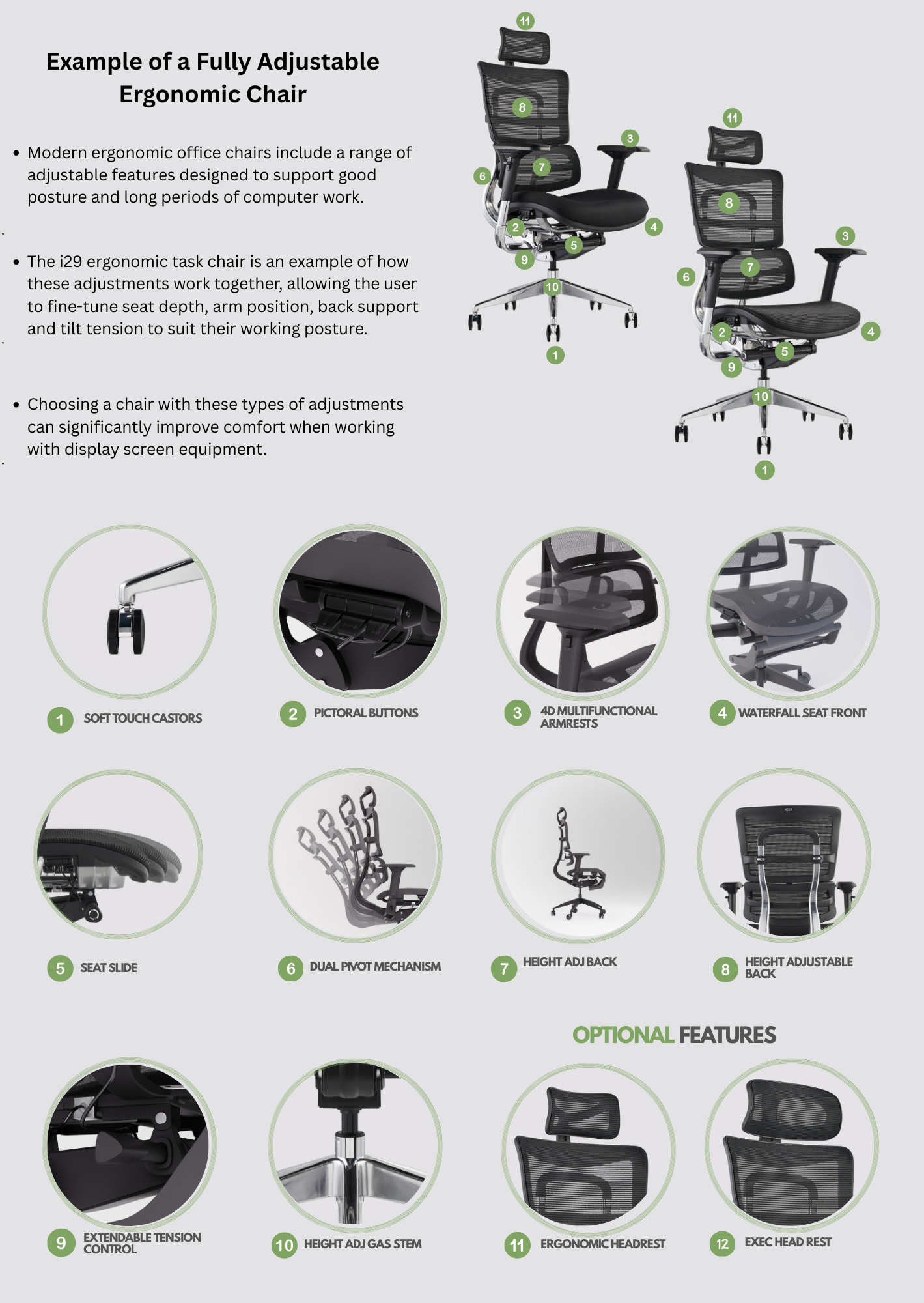
Example ergonomic task chair showing adjustable seat depth, lumbar support, armrests and tilt mechanism.
Quick Ergonomic Checklist
Before choosing a chair, check that it offers:
✔ Adjustable seat height
✔ Adjustable lumbar support
✔ Adjustable armrests
✔ Seat depth adjustment
✔ Backrest tilt control
Workstation Assessments and Ergonomic Seating
All About The Office provides DSE workstation assessments to help organisations improve workplace ergonomics and employee comfort.
Ergonomic Office Chairs
Creating a Comfortable Workspace
Selecting the right ergonomic office chair is one of the most effective ways to improve comfort when working at a desk.
Combined with a correctly adjusted workstation, ergonomic seating helps reduce strain and supports better posture throughout the working day.
If you're unsure which seating adjustments or workstation setup are most suitable, a professional DSE workstation assessment can help identify the best solution.
Related Guides
• How to Adjust an Office Chair Correctly
• DSE Workstation Setup Guide
• DSE Workstation Assessments